Drawquarium Food Editor: Draw Meals Your Fish Eat
How the Drawquarium food editor works, which shapes to draw, how portion size affects leftovers, and why bottom feeders still need the vacuum.
Food in Drawquarium is drawn, not bought from a menu. The food editor uses the same canvas as the fish editor but swaps the template row for simple shapes and gives you a much larger brush. The result is a small, charming system with one real decision: how big to make each piece. This guide covers the editor, the shapes that work, and the feeding habits that keep a tank clean.
Food uses the same editor as fish, so the drawing guide→ applies here too.
The editor in one look
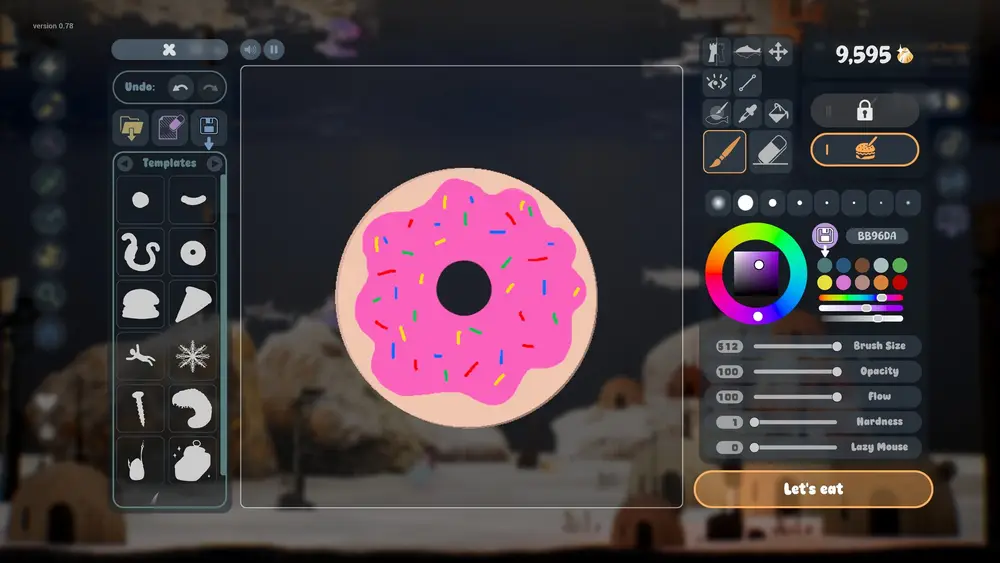
The official screenshot shows a donut on the canvas, a template row with a circle, a banana, a snake, a donut, and a snowman, and brush settings of Size 512, Opacity 100, Flow 100, Hardness 1, Lazy Mouse 0. The bottom button reads "Let's eat".
Those settings are deliberate. A soft, huge brush produces food that looks like food: rounded, irregular, and soft-edged. You are not painting a fish; you are making a dumpling.
Why the brush is so large
Food is viewed at tank scale, often falling or drifting. A small, detailed meal disappears. A big soft shape reads as a piece of food even when it is partially eaten or partially hidden by a fish.
Start at size 512 and work down only if the tank is small or the fish are babies. For fry, drop to 100–150 and make tiny portions.
Shapes that work
Circles and blobs. The default. Easy to eat, easy to animate, and they look like pellets or fruit.
Bananas and curves. Good for bottom feeders, because a curved shape settles on the substrate and reads as a leftover.
Donuts. The screenshot example. A hole in the middle makes the food look softer and gives small fish something to nibble.
Snowmen and stacks. Fun for a screenshot, awkward in practice because the shape breaks apart into multiple pieces.
Snakes and long shapes. Best for large fish. A long piece gives a shark something to chase.
Avoid thin, spindly shapes. They clip through fish mouths and leave fragments that are hard to vacuum.
Portion size is the real mechanic
There is no published nutrition value or hunger restoration number. What the game does show is a hunger ring and the physical result of overfeeding: food that is not eaten stays in the tank.
Three rules follow:
- One piece per fish per pass. Drop, watch, repeat only if the ring is still low.
- Match the piece to the mouth. A piece wider than the fish's body will be nibbled and abandoned.
- Feed before cleaning, not after. The vacuum is the last step of a meal, not a separate chore.
A tank that is fed three small times a day is cleaner than a tank fed one huge meal.
Food and bottom feeders
The demo page lists bottom-feeding fish that only eat leftover food. That makes food design a support system: a piece that sinks is not wasted, because a bottom feeder will find it. A piece that floats and dissolves is wasted.
If you keep bottom feeders, favor denser shapes that sink. If you keep mid-water fish, favor soft shapes that break apart as they fall.
Saving and reusing food
The editor allows you to save a drawing, and the template system supports custom templates and categories. Save two or three foods you like:
- A small pellet for everyday feeding.
- A larger treat for a new fish or a breeding pair.
- A tiny fry food for babies.
Reusing a saved food keeps the tank visually consistent. A fish tank where every meal looks different looks like a test scene.
Draw food in the same palette as your tank. A bright pink donut in a blue-green reef is funny once and distracting forever.
Official source: Drawquarium demo page ↗ and the store page ↗, rokaplay ↗ and the Drawquarium Discord ↗
Do fish have favorite foods?
The store page does not describe food preferences. The September update says fish react to food, but reaction is not preference. If favorites exist, they are not documented, and no guide should pretend to list them.
What does exist is behavior: some fish go for food immediately, some wait, and bottom feeders wait for it to sink. Watch your tank and feed accordingly.
Common food mistakes
Making food too detailed. A fish does not care about a face on its dinner. Detail is wasted polygons.
Making food too large. The most common cause of a dirty tank. Halve the size and feed twice.
Using food as decoration. Food that is not eaten rots. Do not leave a beautiful meal in the tank for the screenshot.
Forgetting fry. Baby fish need smaller pieces than adults. A normal pellet is a boulder to a newborn.
FAQ
Can I feed fish without drawing food?
The food editor is the documented path. Whether the game has a default pellet is not confirmed in the store material.
Does food type affect growth?
No relationship between food type and growth is published. Feeding at all is the confirmed input; the shape is cosmetic.
Why is food floating instead of sinking?
Density and shape affect how food moves, but the game does not publish physics values. A soft, thin shape tends to drift; a dense blob tends to sink.
Can I feed a fish by clicking it?
The fish card has a feed action, and the tank rail has a feed icon. The exact interaction differs by context, but both paths exist in the official screenshots.
More Drawquarium Guides
How levels, days old, medals, metallic shimmer, and golden fish work in Drawquarium, and what the level 25 goal actually asks for.
A Drawquarium fish list built from official screenshots and patch notes: body templates, bottom feeders, jellyfish, sharks, and golden fish.
Use Drawquarium as a focus companion: the clock, timer, journal, checklist, and wallpaper mode, plus a simple work session setup.
A practical Drawquarium guide for the first hour: draw a fish that reads well, feed it, finish early goals, and unlock your first upgrades.
Where Drawquarium runs: Windows PC requirements, Mac and Linux answers, Steam Deck compatibility, mobile, and console availability.
Drawquarium's price has not been announced. What is confirmed, how regional pricing works, whether it is free, and how to avoid overpaying.
Drawquarium launches on November 13, 2026 for Windows on Steam. What is confirmed about the release, the trailer, wishlists, and launch day.
How the Drawquarium template grid works: fish, eyes, fins, and food categories, Golden Scale unlocks, custom templates, and saved palettes.