
Golden Scales Guide: Earn, Spend, and Save
How Golden Scales work in Drawquarium: where they come from, what they unlock, a sensible spending order, and why farming rates are not published.
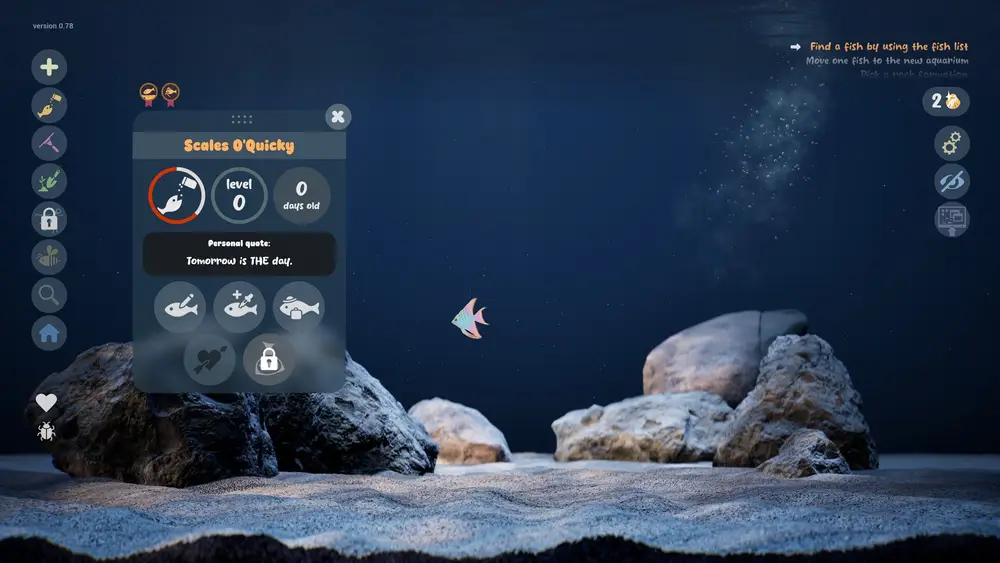
Golden Scales are Drawquarium's progression currency. You collect them, then spend them on templates, brushes, tank parts, and customization. The game shows the balance in the top right of the tank screen and the price on every locked item, so the economy is transparent at the point of sale. What the game does not publish is a farming rate, which means the useful advice is about order rather than optimization.
What to buy first is covered in the unlock guide→.
Where scales come from
Confirmed sources:
- Floating pickups. The screenshots show glowing scales drifting in the water. Click them.
- Goals. The goals panel rewards progress with currency and unlocks.
- Care milestones. The demo page and October posts connect good care to shimmer and golden fish; whether those specifically pay scales is not spelled out, but care is the game's core loop.
Unconfirmed sources: daily login bonuses, achievements, trading, or anything that requires a shop. Steam does not list achievements for the game, so an achievement-based scale source is unlikely.
What scales buy
The unlock popup in the official gallery is the clearest evidence of pricing: "Unlock for 2 Golden Scales / You have 8". That is a template price early in the game. The September update lists the categories scales feed into:
- Brushes and editor tools.
- Templates and custom template slots.
- Tank customization: rocks, driftwood, water, sand, colors.
- Decoration and backgrounds.
Later unlocks are presumably more expensive, but no price list is published. Do not trust a guide that quotes exact costs for the whole catalog.
A spending order that respects your time
First 10 scales: one alternate body. Buy a jellyfish or a shark only if you will draw it this week. A template you never use is the most common waste in the early game.
Next 20: an editor upgrade. A brush or fill improvement changes every drawing after it. This is the highest-leverage purchase in the game.
Next 30: a tank layer. Sand, rocks, or driftwood changes every screenshot and every wallpaper session. It is better value than a single fish.
After that: save for a second tank. The goals in the screenshots include moving a fish to a new aquarium, which implies a second tank is part of normal progression. A second tank doubles your projects and your storage.
Do not farm scales
There is no published rate, and the game is not built around grinding. The reliable loop is: keep fish fed, keep the tank clean, finish goals, click floating scales. That loop produces enough currency to keep progressing without turning the game into a job.
If you find yourself vacuuming for currency instead of enjoyment, stop. The game has no fail state and no timed event that punishes a pause.
Scales and the golden fish
Golden fish and Golden Scales share a color, not a mechanic. A golden fish is a care outcome; a scale is currency. The naming is thematic, and it is easy to conflate them in a search.
If you want a golden fish, focus on one fish and keep it healthy for a long time. If you want scales, focus on goals and pickups. The two goals overlap, but they are not the same.
Before you spend, open the tank and look at the locked item in context. A template that looks great in the grid can look ordinary in your water color.
Official source: Drawquarium store page ↗ and the September update ↗, rokaplay ↗ and the Drawquarium Discord ↗
What to do if you feel stuck
If progress stalls, the goals panel is the designed answer. If it is empty, do a maintenance pass: feed, vacuum, collect pickups, check relationships. Progress in this game is mostly a byproduct of routine, not a puzzle to solve.
If you have spent scales badly, you have not bricked the save. The game has no fail state, and scales keep coming from the same loop. Treat the wasted purchase as a lesson in what you actually draw.
FAQ
How do I get Golden Scales fast?
There is no published fast method. Goals and floating pickups are the confirmed sources, and both come from playing normally.
Can I buy Golden Scales with real money?
No microtransaction store is listed on the Steam page. The game is a single purchase with an in-game currency.
Do scales carry between saves?
Unknown. The currency counter appears global to the profile in the screenshots, but the game does not document save behavior.
What happens if I spend all my scales?
Nothing permanent. You keep playing, complete goals, and collect more. The game has no debt or negative balance.
More Drawquarium Guides
How levels, days old, medals, metallic shimmer, and golden fish work in Drawquarium, and what the level 25 goal actually asks for.
A Drawquarium fish list built from official screenshots and patch notes: body templates, bottom feeders, jellyfish, sharks, and golden fish.
Use Drawquarium as a focus companion: the clock, timer, journal, checklist, and wallpaper mode, plus a simple work session setup.
How the Drawquarium food editor works, which shapes to draw, how portion size affects leftovers, and why bottom feeders still need the vacuum.
A practical Drawquarium guide for the first hour: draw a fish that reads well, feed it, finish early goals, and unlock your first upgrades.
Where Drawquarium runs: Windows PC requirements, Mac and Linux answers, Steam Deck compatibility, mobile, and console availability.
Drawquarium's price has not been announced. What is confirmed, how regional pricing works, whether it is free, and how to avoid overpaying.
Drawquarium launches on November 13, 2026 for Windows on Steam. What is confirmed about the release, the trailer, wishlists, and launch day.