
Drawquarium Templates: Unlocks and Custom Slots
How the Drawquarium template grid works: fish, eyes, fins, and food categories, Golden Scale unlocks, custom templates, and saved palettes.
The template grid is the first thing you see in the Drawquarium editor and the main thing you spend Golden Scales on. It is easy to treat templates as a shopping list, but they are better understood as starting bodies: a template gives you a shape that already animates, and your drawing turns it into a specific fish. This guide explains the categories, the unlock flow, and the custom template features the developer has described.
Templates are shortcuts inside the editor; the drawing guide→ explains the tools around them.
What a template actually does
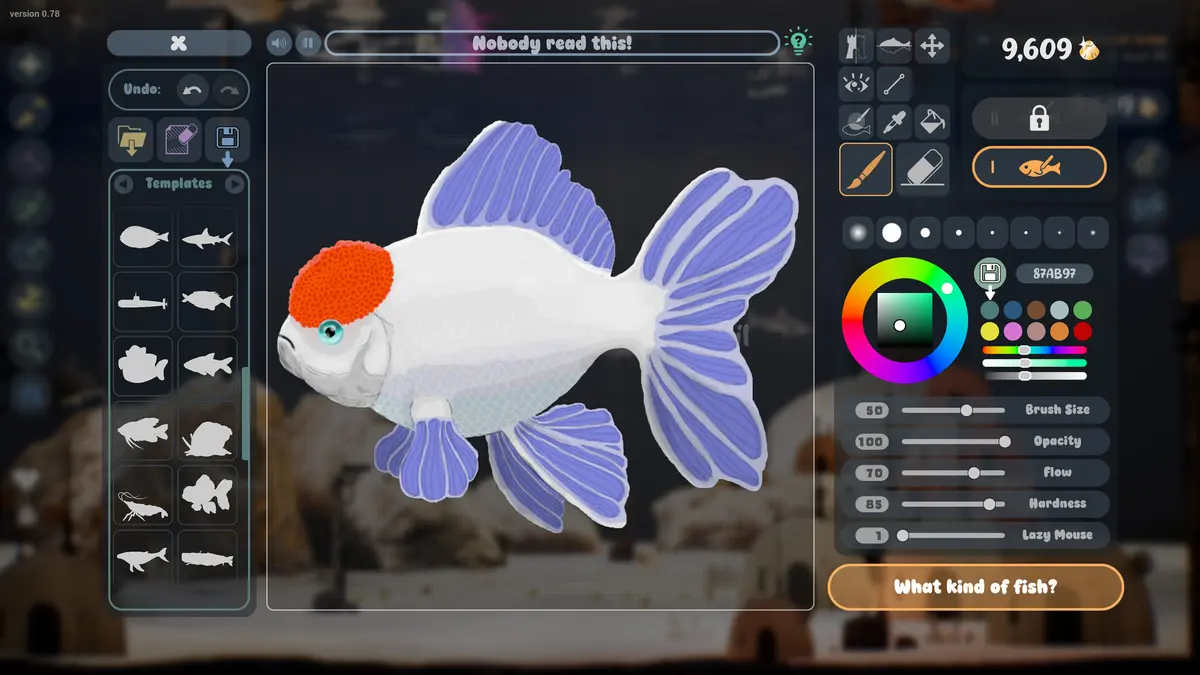
A template is a body outline plus an animation rig. When you pick one, you are not picking a species with stats; you are picking a silhouette that the game knows how to move. That is why the grid includes fish, jellyfish, sharks, sailfish, eyes, and food shapes: each category maps to a different kind of rig or part.
Drawing on a template is faster and safer than starting blank. The body already bends correctly, the fins are in plausible places, and the scale is consistent with other fish in the tank.
The categories
Fish bodies. The standard oval body, plus variants with different proportions. This is where most first fish come from.
Jellyfish. A bell and tentacles. The rig drifts rather than swims.
Sharks and sailfish. Large predator and fast-swimmer silhouettes. These are centerpiece templates and need open water.
Eyes. A grid of eye art with tooltips. Eyes are a part, not a body, and they can be placed on any face.
Fins and details. The September update mentions fins and shapes as editor additions. These are likely part templates rather than full bodies.
Food shapes. Circles, bananas, snakes, donuts, snowmen. The food editor uses the same grid with a different palette.
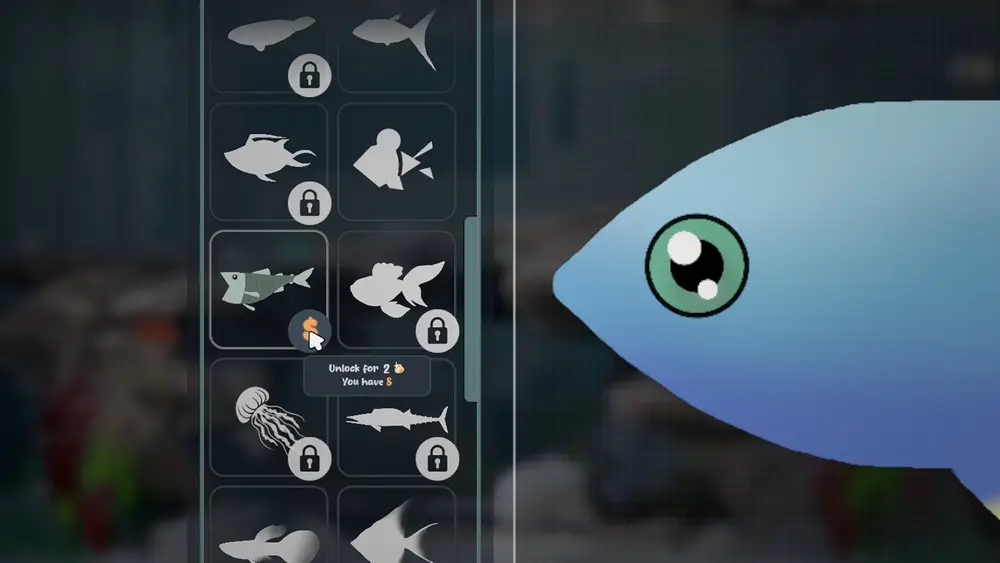
The screenshot of the template popup shows fish, jellyfish, shark, and sailfish silhouettes in one view, which suggests the body categories are grouped rather than scattered.
Unlocking with Golden Scales
Locked templates show a price. The official popup reads "Unlock for 2 Golden Scales / You have 8", so the game shows both the cost and your balance before you confirm. Early prices are small enough to experiment; later templates and tank parts are the real sinks.
A sensible unlock order:
- One alternate body you will actually draw (jellyfish or shark).
- A part category that fixes a weakness in your drawings (eyes or fins).
- A food shape if you are bored of circles.
- Everything else, only when you have a project that needs it.
Do not unlock a template just because it is expensive. Price is not a measure of usefulness in this game.
Custom templates and categories
The demo page lists the ability to create and save your own templates and categories. That turns the grid into a personal library: draw a body you like, save it as a template, and reuse it for a whole school or a family of fish.
Custom categories are useful once the built-in list gets long. Group by project (reef tank, kid's tank, disco tank) rather than by species, because projects are how you actually think when you sit down to draw.
Weekly themes and the Idea Generator
The demo page mentions weekly themes, and the September update mentions an Idea Generator. Both are prompts rather than mechanics: a theme gives you a constraint, and the generator gives you a starting concept when you are blank.
Use them when you are in a rut. A constraint such as "one color plus white" or "a fish that looks like a household object" produces more interesting fish than staring at an empty canvas.
Saved palettes
The September update lists saved color palettes as an editor addition. Build two or three palettes per tank:
- A base palette for the fish bodies.
- An accent palette for eyes, fins, and spots.
- A background palette for plants and decor.
Reusing a palette is the fastest way to make a tank look intentional. It also makes imported art easier to blend, because you can tint the import toward the same colors.
Name custom templates the way you name fish. "Reef body small" is easier to find than "Template 4" when you are scrolling a long grid.
Official source: Drawquarium demo page ↗ and the September update ↗, rokaplay ↗ and the Drawquarium Discord ↗
Are templates pay-to-win?
No. The game has no combat and no competitive progression. A template saves drawing time; it does not make a fish healthier, faster-growing, or more valuable. The only advantage is convenience.
That also means you can ignore the grid entirely and draw from scratch if you prefer. The game does not lock the canvas behind unlocks as far as the store page says.
FAQ
How many templates are there?
No count is published. The grid in the screenshots shows several fish, a jellyfish, a shark, and a sailfish, plus eye and food categories.
Do templates unlock through play or only through scales?
The popup shows a Golden Scale price, so scales are the confirmed currency. Whether some templates unlock through goals or events is not documented.
Can I save my own template?
Yes. The demo page lists creating and saving custom templates and categories.
Do template unlocks carry between tanks?
Unlocks appear to be account-wide, since the currency is a single counter. The store page does not explicitly confirm this, so treat it as likely rather than certain.
More Drawquarium Guides
How levels, days old, medals, metallic shimmer, and golden fish work in Drawquarium, and what the level 25 goal actually asks for.
A Drawquarium fish list built from official screenshots and patch notes: body templates, bottom feeders, jellyfish, sharks, and golden fish.
Use Drawquarium as a focus companion: the clock, timer, journal, checklist, and wallpaper mode, plus a simple work session setup.
How the Drawquarium food editor works, which shapes to draw, how portion size affects leftovers, and why bottom feeders still need the vacuum.
A practical Drawquarium guide for the first hour: draw a fish that reads well, feed it, finish early goals, and unlock your first upgrades.
Where Drawquarium runs: Windows PC requirements, Mac and Linux answers, Steam Deck compatibility, mobile, and console availability.
Drawquarium's price has not been announced. What is confirmed, how regional pricing works, whether it is free, and how to avoid overpaying.
Drawquarium launches on November 13, 2026 for Windows on Steam. What is confirmed about the release, the trailer, wishlists, and launch day.